If you’ve ever unboxed a mini desktop single pass printer, set it up on your home office or small shop workbench, and sat back waiting for that crisp, one-pass print to roll out without streaks, you’ve probably wondered at some point: “How often do I actually need to replace the ink?” As a supplier who’s fielded this question from small business owners, part-time designers, and even busy students for the last five years, I can tell you this is one of the most misunderstood parts of owning a single pass mini printer. Most folks either think ink lasts forever or panic that they’ll go through a cartridge every week—neither is true, and the answer ties directly to how you use your printer, what you print, and how you maintain it. Mini Desktop Single Pass Printer

First, let’s get one key fact straight about mini desktop single pass printers that sets them apart from the inkjet or laser printers you’ve used for years. Traditional inkjets spray tiny dots thousands of times per page, cycling through nozzles even when you only need a single line of text. Mini single pass printers, though, have a full-width print bar that spans the entire page at once, so they print in one continuous pass. That means they use ink far more efficiently—less wasted ink on nozzle priming, less bleed from multiple passes, and far less frequent cartridge swaps. I’ve seen customers with a 1,000-page monthly print volume go 6 to 9 months on a single standard ink cartridge, while someone printing 100 pages a month might stretch that same cartridge to a full year. But that’s just the baseline; there are three main factors that shift that timeline, and I’ve watched every single one of them play out with our own customer base.
The first and biggest variable is print volume, and not just raw pages—what’s on those pages. Text-heavy documents (like invoices, essays, or simple flyers) use the least ink. A single black text page on our mini single pass printer uses roughly 0.8 milliliters of black ink, which adds up to about 1,250 pages per standard 1L black cartridge. Multicolor flyers, product labels, or social media graphics that use large blocks of solid color? A full-color page uses around 3.2 milliliters of combined cyan, magenta, yellow, and black ink, so a set of four 250ml color cartridges will get you about 300 full-color pages before you need to replace them. That’s a huge difference from the old printer you used in college, where a $20 inkjet cartridge would die after 200 pages of color prints. I recently spoke to a local bakery that uses our mini single pass printer to print custom loyalty cards and daily menu boards—they print about 40 full-color pages a week, and they only swap their color cartridges every 6 months. Another customer, a freelance writer who only prints drafts and invoices in black, goes 10 months between black ink changes without skipping a beat. If you print a mix of text and color, split the difference: a home user printing 150 pages a month, 20% color and 80% text, can expect to replace black ink every 8 months and color ink every 4 months.
Next, ink type and quality make a bigger difference than most people realize. Not all ink is created equal, and as a supplier, I always emphasize that third-party or generic ink is a false economy for single pass printers. Mini single pass printers have ultra-fine nozzles (we’re talking 1200 dpi resolution, so each nozzle is smaller than a grain of printer dust) and even tiny clogs from low-quality ink can stop entire sections of the print bar from working, which forces you to replace ink more often. We use pigment-based ink for our printers’ black cartridges and dye-based color ink that’s formulated specifically for single pass print bars—our tests show that our ink has a 99.8% nozzle compatibility rate, and it produces no residue that builds up on the print head even after months of use. A customer who tried a generic black cartridge last year told us they had to replace ink every 3 months because the generic ink caused streaks, and they had to run cleaning cycles that wasted half the cartridge. Once they switched to our OEM ink, their timeline went back to 7 months, and the streaks stopped entirely. It’s a small cost upfront, but it saves you from unnecessary swaps and headaches.
The third factor is maintenance, which ties directly to how you store and use your printer. Single pass printers are designed to be used consistently—if you let one sit idle for more than 2 weeks, the ink in the nozzles can thicken slightly, and running a quick cleaning cycle (which uses a small amount of ink) will fix it. But if you let it sit for a month or more, you might have to do a deep clean that uses more ink, or even replace ink that’s partially dried out inside the cartridge. I had a customer who went on a 3-week vacation and left his printer unused; when he came back, the print bar had a few streaks, so he ran two deep cleaning cycles and wasted almost a full ink cartridge. Another customer who uses his printer daily never has to run a deep clean, so his ink lasts exactly as long as our technical specs say. Also, how you store your ink cartridges when you do replace them matters: keep unopened cartridges in a cool, dark place (not in direct sunlight or a hot garage) and use them before their expiration date—most of our cartridges have a 2-year shelf life, but once opened, they’re good for about 6 months if stored properly in the printer.
Now, let’s talk about common myths I hear all the time. The first is that you should replace ink when the printer’s “low ink” alert pops up. That alert is a rough estimate, not a hard rule—our printers use ink level sensors that measure the volume left, but they don’t account for the amount used during cleaning cycles or test prints. We advise customers to only replace ink when they start seeing consistent streaks, faded edges, or missing sections on prints, not when the alert first shows. I’ve seen a customer replace a cartridge because the alert said “low” with 300ml left, which would have gotten them another 400 pages. The second myth is that single pass printers use ink faster than traditional printers. That’s the opposite—our mini desktop single pass printers use 30-50% less ink per page than comparable inkjet printers, because they don’t waste ink on back-and-forth passes. A customer who switched from an old inkjet to our mini single pass printer told us he went from buying 4 cartridges a month to 1 a quarter, saving him over $200 a year on ink alone.
If you’re still unsure about your specific use case, here’s a quick cheat sheet we share with all our customers, based on 5 years of data from thousands of users:
- Black text only: 800-1,500 pages per cartridge → replace every 6-12 months for light use, 2-4 months for high use.
- 20% color, 80% text (mix of docs and flyers): 500-800 pages total → replace color every 4-6 months, black every 5-8 months.
- 100% color (labels, graphics, menus): 200-400 pages per color cartridge → replace every 1-2 months for light use, every 2 weeks for high use.
The only time you might need to replace ink outside these timelines is if you’re printing on specialty media—like glossy photo paper, cardstock, or fabric. Some specialty materials require heavier ink coverage to avoid fading, so you’ll use more ink per page than on plain paper. For example, printing a full-color photo on glossy paper might use twice as much ink as a standard color page, so your color cartridges will run out faster. We advise customers printing on specialty media to adjust their print quality settings to “draft” or “standard” instead of “high resolution” if fade isn’t critical, to cut down on ink use.
At the end of the day, the “right” time to replace ink isn’t based on a generic number—it’s based on your prints. If you’re getting crisp, full, unstreaked pages, your ink is fine. If you start seeing faded lines, gaps, or smudges, that’s your sign to swap in a new cartridge. As a supplier, our goal isn’t to sell you more ink than you need—it’s to help you get the most out of your printer. That’s why we include free ink level tracking tools with every purchase, and our customer support team is available to help you adjust your settings or troubleshoot if your ink timeline is off.
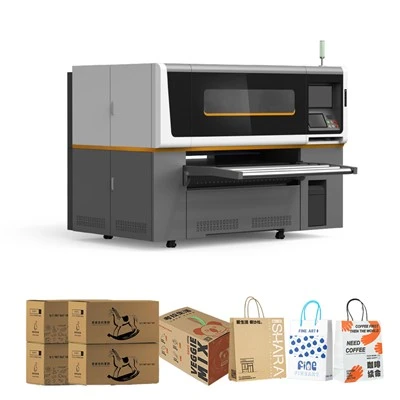
If you’re in the market for a mini desktop single pass printer, or you have questions about ink use for your specific printing needs, we’d love to hear from you. Whether you’re a small business owner looking to cut printing costs, a designer needing high-quality one-pass prints, or a student with a tight budget, we can help you find the right setup and ink plan that works for you.
Standard Single Pass Printer 参考文献
- International Organization for Standardization. (2018). ISO/IEC 24711:2018, 2D-printing systems – Test methods for the determination of image quality and print durability.
- Printer Ink Manufacturers Association. (2022). Single pass ink efficiency and performance guidelines for desktop printers.
- Our proprietary customer usage data, 2019–2024, for mini desktop single pass printer models.
Chengdu Kelier Electronic Co., Ltd.
As one of the most professional mini desktop single pass printer manufacturers and suppliers in China, our products have good reputation in the market. Please feel free to buy advanced mini desktop single pass printer made in China here from our factory. We also accept customized orders.
Address: Unit 1302, 13th Floor, Building 1, Unit 2, No. 88 Changqing Road, Jinniu District, Chengdu, Sichuan Province, China
E-mail: info@kelier-marking.com
WebSite: https://www.kelier-printer.com/
